V. Voltage Source
Symbol Names: VOLTAGE, BATTERY
Constant Voltage Source
Syntax:
Vxxx n+ n- <voltage> [AC=<amplitude>] [Rser=<value>] [Cpar=<value>]
This element sources a constant voltage between nodes n+ and n-. For AC analysis, the value of AC is used as the amplitude of the source at the analysis frequency. A series resistance and parallel capacitance can be defined. The equivalent circuit is:
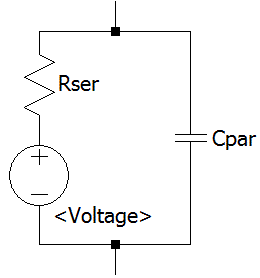
Voltage sources have historically been used as the current meters in SPICE and are used as current sensors for current-controlled elements. If Rser is specified, the voltage source can not be used as a sense element for F, H, or W elements. However, the current of any circuit element, including the voltage source, can be plotted.
Time-Dependent Pulsed Voltage Source
Syntax:
Vxxx n+ n- PULSE(V1 V2 Tdelay Trise Tfall Ton Tperiod Ncycles) [Trigger=<expression> [tripdv=<value>] [tripdt=<value>]]
| Name | Description | Units |
|---|---|---|
| Voff | Initial value | V |
| Von | Pulsed value | V |
| Tdelay | Delay | sec |
| Tr | Rise time | sec |
| Tf | Fall time | sec |
| Ton | On time | sec |
| Tperiod | Period | sec |
| Ncycles | Number of cycles (Omit for free-running pulse function) | cycles |
Time-Dependent Sine Wave Voltage Source
Syntax:
Vxxx n+ n- SINE(Voffset Vamp Freq Td Theta Phi Ncycles) [Trigger=<expression> [tripdv=<value>] [tripdt=<value>]]
| Name | Description | Units |
|---|---|---|
| Voffset | DC offset | V |
| Vamp | Amplitude | V |
| Freq | Frequency | Hz |
| Td | Delay | sec |
| Theta | Damping factor | 1/sec |
| Phi | Phase of sine wave | degrees |
| Ncycles | Number of cycles (Omit for free-running sine function) | cycles |
For times less than Td, the output voltage is given by
Voffset+Vamp*sin(π*Phi/180)
For times after Td, but before Ncycles have completed, the voltage is given by
Voffset+Vamp*exp(-(time-Td)*Theta)*sin(2*π*Freq*(time-Td)+π*Phi/180)
For times after Ncycles have completed, the voltage is the last voltage when Ncycles completed. Note Ncycles does not have to be an integer.
The damping factor, Theta, is the reciprocal of the decay time constant.
Time-Dependent Exponential Voltage Source
Syntax:
Vxxx n+ n- EXP(V1 V2 Td1 Tau1 Td2 Tau2) [Trigger=<expression> [tripdv=<value>] [tripdt=<value>]]
| Name | Description | Units |
|---|---|---|
| V1 | Initial value | V |
| V2 | Pulsed value | V |
| Td1 | Rise delay time | sec |
| Tau1 | Rise-time constant | sec |
| Td2 | Fall delay time | sec |
| Tau2 | Fall-time constant | sec |
For times less than Td1, the output voltage is V1. For times between Td1 and Td2 the voltage is given by
V1+(V2-V1)*(1-exp(-(time-Td1)/Tau1))
For times after Td2 the voltage is given by
V1+(V2-V1)*(1-exp(-(time-Td1)/Tau1))-(V2-V1)*(1-exp(-(time-Td2)/Tau2))
Time-Dependent Single Frequency FM Voltage Source
Syntax:
Vxxx n+ n- SFFM(Voff Vamp Fcar MDI Fsig) [Trigger=<expression> [tripdv=<value>] [tripdt=<value>]]
| Name | Description | Units |
|---|---|---|
| Voff | DC offset | V |
| Vamp | Amplitude | V |
| Fcar | Carrier frequency | Hz |
| MDI | Modulation index | - |
| Fsig | Signal frequency | Hz |
The voltage is given by
Voff+Vamp*sin((2.*π*Fcar*time)+MDI*sin(2.*π*Fsig*time))
Arbitrary Piece-Wise Linear Voltage Source
Syntax:
Vxxx n+ n- PWL [TIME_SCALE_FACTOR=<time_factor>] [VALUE_SCALE_FACTOR=<value_factor>] PwlSpec [ PwlSpec [ ... ] ]
+ [Trigger=<expression> [tripdv=<value>] [tripdt=<value>]]
TIME_SCALE_FACTOR scales all time values in this source by <time_factor>, and VALUE_SCALE_FACTOR scales all magnitude values by <value_factor>. PwlSpec can be any of the following:
- (<time>, <value> [, <time>, <value> [, ...]] )
One or more data points. LTspice uses linear interpolation between these points. - REPEAT FOR <n> PwlSpec ENDREPEAT
Repeats PwlSpec <n> times. - REPEAT FOREVER PwlSpec ENDREPEAT
Repeats PwlSpec until the end of the simulation. - FILE=<filename>
One or more data points read from file <filename>. <filename> is either an absolute path or a relative path computed from the directory containing the simulation netlist. Double quotes may be used to specify a path containing spaces. The data points must be separated by white space or comma and can be put in multiple lines. Each number can be specified using the usual SPICE engineering notation, comments are also allowed.
If the size of this file exceeds 2GiB, LTspice employs a specialized high-speed parser which only recognizes pure floating point numbers separated by white space, comma or new lines, with no comments. - SCOPEDATA=<filename>
One or more data points read from file <filename>. <filename> is either an absolute path or a relative path computed from the directory containing the simulation netlist. Double quotes may be used to specify a path containing spaces. The data points must be separated by white space or comma and can be put in multiple lines. A leading "+" has no special meaning. Only pure floating point number are allowed, no comments.
Negative x-values are discarded. Multiple pairs with identical x-values are combined by averaging their y-values.
All these variants can be combined and nested indefinitely. A time value that starts with "+" is relative to the previous time point. This even works for expressions, for example:
+10u
+{PARAM/23+1n}
Data points which are shifted in time by REPEAT or Trigger are relative to their respective start time. For example:
REPEAT FOR 3 (1,10,3,30) ENDREPEAT
creates these data points:
| time | value |
|---|---|
| 1 | 10 |
| 3 | 30 |
| 4 | 10 |
| 6 | 30 |
| 7 | 10 |
| 9 | 30 |
Note that it is possible to specify contradicting values, for example:
REPEAT FOR 3 (0,0,1,10) ENDREPEAT
This is ill-formed and will raise an error, because the first time is zero but the corresponding value differs from the last one.
The voltage source will output the first specified value for all times less than the first time point and the last specified value for all times larger than the last time point.
Trigger Parameter
Trigger is an optional expression that is continuously evaluated and converted to a Boolean value. It restarts the entire sequence every time it changes from false to true. When it is false, the voltage source outputs the first value of the sequence. Tripdv and tripdt control step rejection for this trigger expression. If the value of the trigger expression changes by more than tripdv in tripdt seconds, that simulation time step is rejected.
.WAV-File Voltage Source
Syntax:
Vxxx n+ n- wavefile=<filename> [chan=<nnn>]
This allows a .wav file to be used as an input to LTspice. <filename> is either an absolute path for the .wav file or a relative path computed from the directory containing the simulation schematic or netlist. Double quotes may be used to specify a path containing spaces. The .wav file may contain up to 65536 channels, numbered 0 to 65535. Chan may be set to specify which channel is used. By default, the first channel, number 0, is used. The .wav file is interpreted as having a full scale range from -1V to 1V.
This source only has meaning in a .tran analysis.
Copyright © 1998–2025 by Analog Devices Inc. All Rights Reserved.